
Overview
为了了解每月消费情况,方便做月度/季度/年度的家庭财务总结,我被迫有了记账的习惯。 之前开了一张Google Sheet(毕竟工作一直用到),打开手机或电脑,随时记录每一笔支出。
最近换了一张新的信用卡,默认所有消费都会发送邮件提醒之后,我终于下定决心偷个懒,把整个流程自动化:
- 扫描收件箱,找到消费提醒邮件,自动提取时间、金额、商户。
- 将提取的信息,作为新的一行,添加到日常账本Google Sheet。
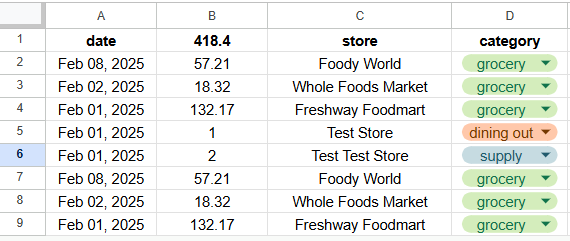
- 我还添加了一列“分类”,方便计算恩格尔系数。
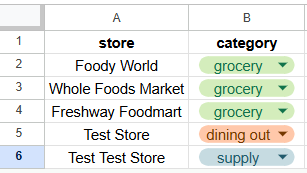
- 为了不用每次手动选择“分类”,我添加了第二个数据库tab,保存“商户”-“分类”的对应关系。
- 如果新的消费记录里的商户已经在数据库中,自动搜索并添加对应“分类”。
- 如果有新的商户,在我手动选择“分类”之后,自动更新数据库。
Step by Step - Google Apps Script
ChatGPT建议使用基于JavaScript的Google Apps Script平台完成以上全部过程。
我只会写Python不会写JS,不过GPT老师提供了大部分代码和详细的说明,有一些代码基础就能看懂,稍微改一下就可以成功运行啦。
添加代码到Code.gs
- 创建一个Google Sheet,第一个Tab命名为Transactions用来储存所有消费记录,第二个Tab命名为StoreCategory用来储存商户-分类数据库。
- Google Sheet ➡️ Extensions ➡️ Apps Script,页面会自动转到Code.gs
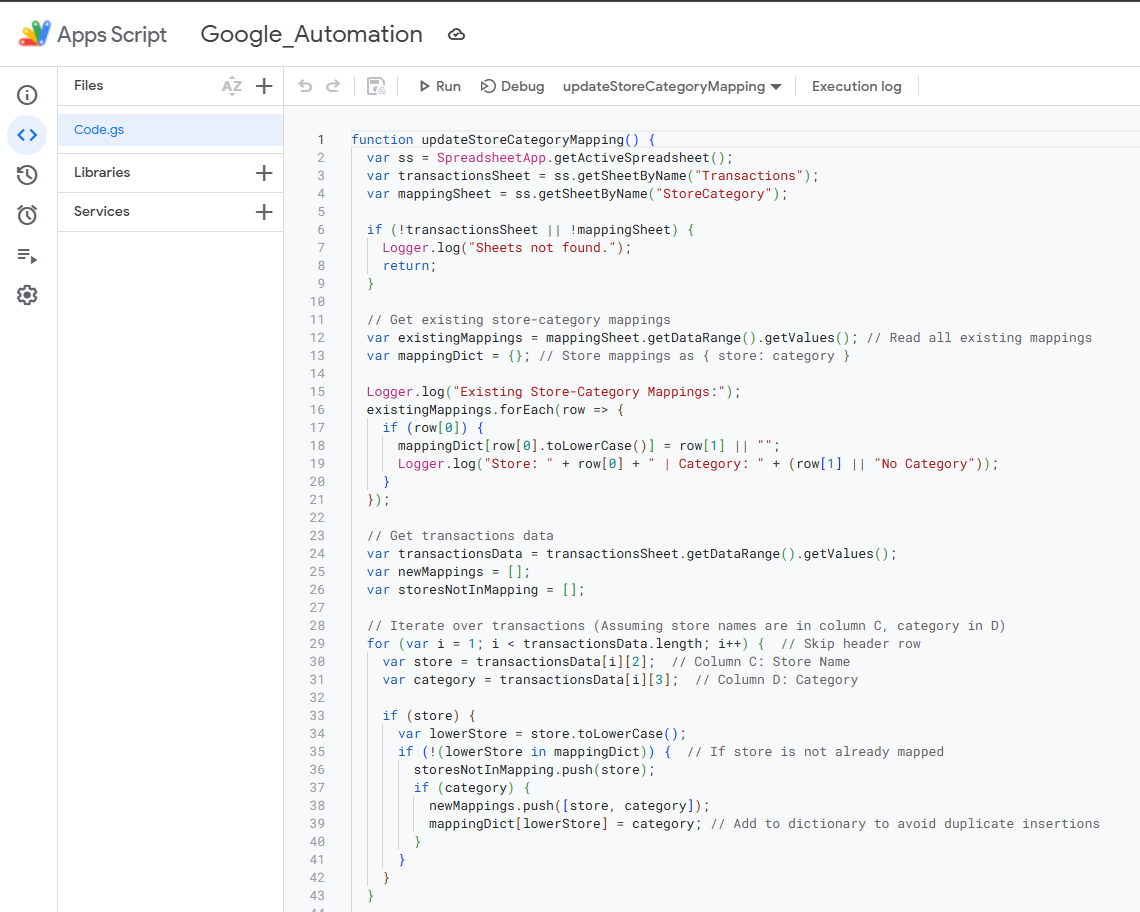
Apps Script - 粘贴以下读取email信息的代码
- 更新Google Sheet ID,ID是页面链接里
/d/和/edit?之间的一长串乱码 - 根据邮件名称搜索,并选择一天之内的邮件
- 用正则提取邮件正文里的日期,金额,商户信息。我的邮件正文例子是:“Attempt of $金额 was made on 日期 on your credit card at 商户 in city xxx.”
- 用categoryMap函数去数据库搜索Category是否已经存在,是的话自动选择Category,否则返回空值
- 为了好看,把全部大写的商户名字改成正常大小写
- 更新Google Sheet ID,ID是页面链接里
function extractEmailsToSheet() {
  var ss = SpreadsheetApp.openById("更新你的GooglesheetID");
  var sheet = ss.getSheetByName("Transactions");
  var categorySheet = ss.getSheetByName("StoreCategory");  // Store-to-category mapping
  var categoryMap = getCategoryMapping(categorySheet);

  var threads = GmailApp.search('subject:"Purchase amount alert" newer_than:1d'); // Modify search query
  var messages = threads.map(thread => thread.getMessages()).flat();

  messages.forEach(message => {
    var body = message.getPlainBody();
    // Extract Date, Amount, Store (Modify regex based on email format)
    var amountMatch = body.match(/of \$(\d+\.\d{2}) was/);  // Example: 12/31/2024
    var dateMatch = body.match(/was made on (\w+ \d{1,2}, \d{4})/);         // Example: $12.34
    var storeMatch = body.match(/at (.*?) in/);               // Example: "at Walmart."

    var date = dateMatch ? dateMatch[1] : "N/A";
    var amount = amountMatch ? amountMatch[1] : "N/A";
    var store = storeMatch ? storeMatch[1] : "Unknown";
    var formattedStore = toTitleCase(store);

    var category = categoryMap[formattedStore] || "";

    Logger.log(date)
    Logger.log(amount)
    Logger.log(formattedStore)
    Logger.log(category)

    // Append to Google Sheet
    sheet.appendRow([date, amount, formattedStore, category]);
  });
}

function toTitleCase(text) {
  return text.toLowerCase().replace(/\b\w/g, function(char) {
    return char.toUpperCase();
  });
}

function getCategoryMapping(sheet) {
  var data = sheet.getDataRange().getValues();
  var map = {};
  for (var i = 1; i < data.length; i++) { // Skip header row
    var store = toTitleCase(data[i][0]); // Normalize store name
    var category = data[i][1];

    if (store) {
      map[store] = category;
    }
  }
return map;
}
- 粘贴以下更新数据库的代码
- 同样的,更新Google Sheet ID,ID是页面链接里
/d/和/edit?之间的一长串乱码
- 同样的,更新Google Sheet ID,ID是页面链接里
function updateStoreCategoryMapping() {
  var ss = SpreadsheetApp.openById("更新你的GooglesheetID");
  var transactionsSheet = ss.getSheetByName("Transactions");
  var mappingSheet = ss.getSheetByName("StoreCategory");

  if (!transactionsSheet || !mappingSheet) {
    Logger.log("Sheets not found.");
    return;
  }

  // Get existing store-category mappings
  var existingMappings = mappingSheet.getDataRange().getValues(); // Read all existing mappings
  var mappingDict = {}; // Store mappings as { store: category }

  Logger.log("Existing Store-Category Mappings:");
  existingMappings.forEach(row => {
    if (row[0]) {
      mappingDict[row[0].toLowerCase()] = row[1] || "";
      Logger.log("Store: " + row[0] + " | Category: " + (row[1] || "No Category"));
    }
  });

  // Get transactions data
  var transactionsData = transactionsSheet.getDataRange().getValues();
  var newMappings = [];
  var storesNotInMapping = [];

  // Iterate over transactions (Assuming store names are in column C, category in D)
  for (var i = 1; i < transactionsData.length; i++) {  // Skip header row
    var store = transactionsData[i][2];  // Column C: Store Name
    var category = transactionsData[i][3];  // Column D: Category

    if (store) {
      var lowerStore = store.toLowerCase();
      if (!(lowerStore in mappingDict)) {  // If store is not already mapped
        storesNotInMapping.push(store);
        if (category) {
          newMappings.push([store, category]);
          mappingDict[lowerStore] = category; // Add to dictionary to avoid duplicate insertions
        }
      }
    }
  }

  // Log stores that are not in the mapping table
  if (storesNotInMapping.length > 0) {
    Logger.log("Stores not in mapping table:");
    storesNotInMapping.forEach(store => Logger.log(store));
  } else {
    Logger.log("All stores are already in the mapping table.");
  }

  // Append new store-category pairs to the StoreCategory sheet
  if (newMappings.length > 0) {
    mappingSheet.getRange(mappingSheet.getLastRow() + 1, 1, newMappings.length, 2).setValues(newMappings);
    Logger.log("New mappings added: " + JSON.stringify(newMappings));
  } else {
    Logger.log("No new mappings to add.");
  }
}
测试
- 在Debug的右边选择想要测试的function,点击Run,Execution log会自动弹出,看到显示的信息和Execution completed,就说明代码正确。
- 回到Google Sheet,应该就能看到新添加的消费记录和更新了的数据库。
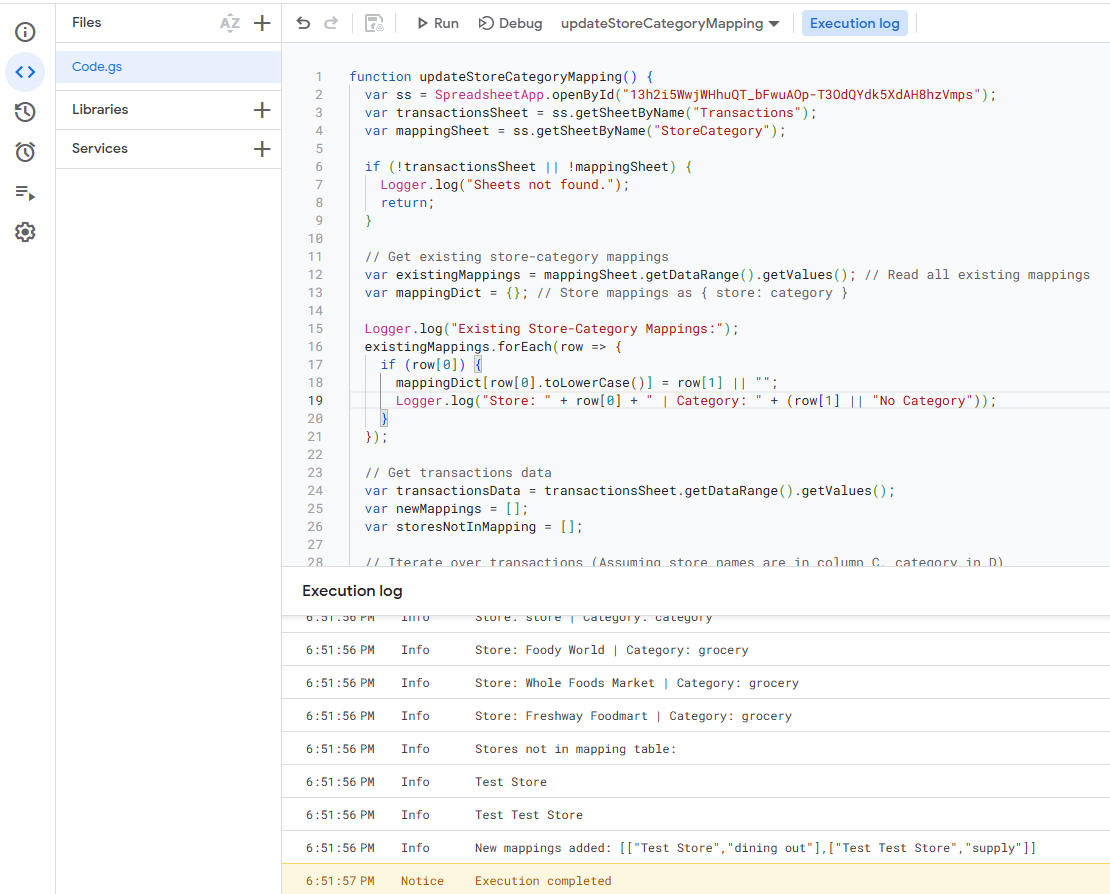
Apps Script, Run
自动运行
- 点击左边的闹钟图标Triggers,添加新的Trigger,选在要自动运行的function ➡️ time-driven ➡️ Day timer ➡️ 选择任意时间
- 因为上述函数里我们抓取最近一天的邮件,所有设置每天自动运行,就不会重复抓。当然也可以让函数自动识别重复的内容,但是我懒。
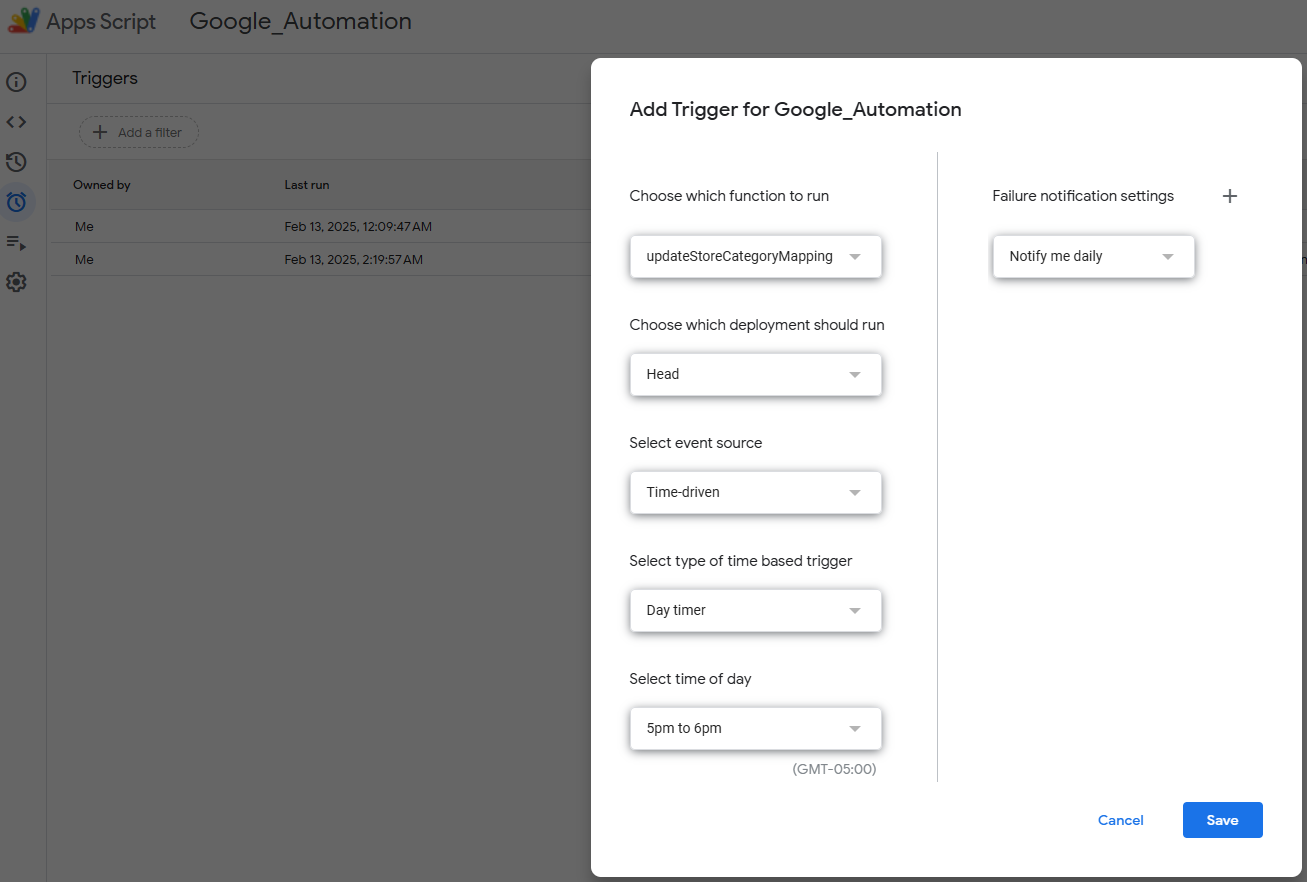
Apps Script, Triggers
Next Steps
建立基本的流水数据库之后我们就可以进行任意分析,比如按照月份加总,得到每个月的总支出。或者按照category做数据透视表,计算恩格尔系数。